One Example of Algorithm Analysis
The main purpose of this analysis is to determine time taken of an algorithm to carry on its process. Suppose for example that a presidential election period is taken place in some country of the world and every elector is approaching to its corresponding table for the sake of get its own data necessary to exercise the right to vote.
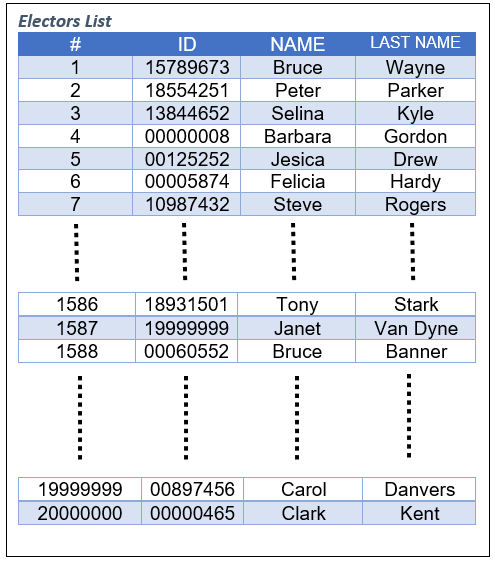
The entire data could be logged in memory whether in an array or in a list. In this case and for example purposes, a basic data structure such as an Array will be used to store all the data, therefore querying a name like Tony Starks in the records needs write some code like this:
A [1586] = {18931501, Tony, Stark}.
And for Selina Kyle is:
A [3] = {13844652, Selina, Kyle}
All data stored in the array is sorted by the order in which every record has been inserted. Once the elector Tony Stark get to the table where he will exercise its vote, he must insert in the software form the index corresponding to its record into the propper field, 1586 and the queried information will be:

For an elector like Peter Parker, who by introducing its index 2, the information that prompt on the screen would be:

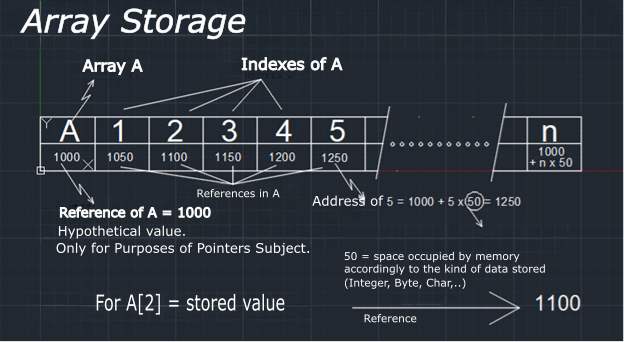
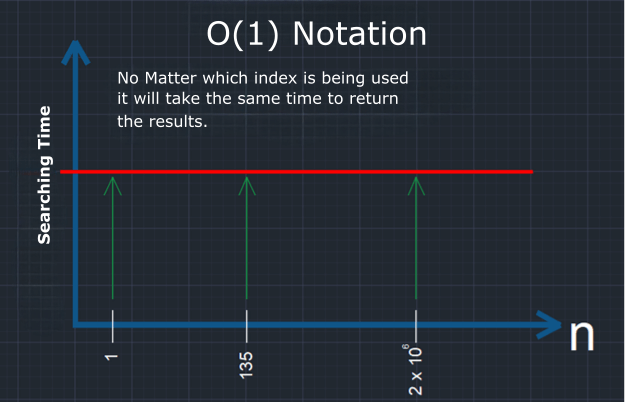
In this case whichever be the elector to be consulted, the response time will be pretty much the same since the array query by index, this aimed its search direct at the memory address where the data is located.
When the array data query takes the same time to return no matter which record this is being searching then it could say that the information access is constant time with O(1) notation.
The time complexity that has been used to search for every elector in the data is of order O(1) which in turn is called constant big O notation or O(1). But something comes up. The previous operation in reality has not been carried out in the way in which all of us wanted, with constant time O(1) because none of the electors know the index that points to their name and id number. For that reason an algorithm must be used in order to seek the right position of the records.
searchElector(ID)n = A.lengthfrom I = 1 to nX = A[I].IDif(X = ID)Return FReturn null
searchElector(13844652)n = 2 x 10^7from I = 1 to nX = A[I].IDif(X = ID)Return FReturn null
The cicles that the algorithm takes for search are:
X = A[I].ID = A[1].ID = 15789673different from 13844652.X = A[I].ID = A[2].ID = 18554251different from 13844652.X = A[I].ID = A[3].ID = 13844652different from 13844652.
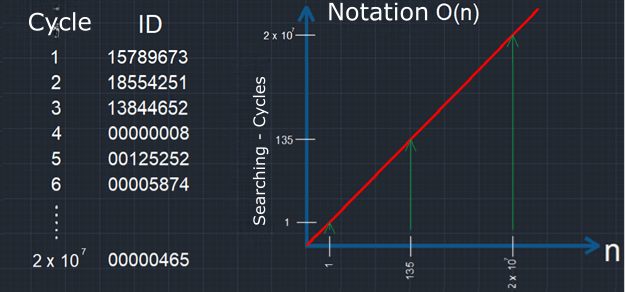
The algorithm will recover: F = [3, 13844652 ,Selina, Kyle] after having checked
the rows one by one. For that activity it took a total of three cycles but if
desired information is located at index 1586 then, 1586 steps must be required by
the algorithm to find the result occurring the same with every row of the array.
No matter who the elector is in order to be consulted, the response time will be pretty much the same since the array query by its index lead its search directly to memory address where the records are located. this kind of search has its cycles directly proportional to the position of the row in which the data is located resulting in a linear behavior denoted with a big O(n);
The worst case by the usage of this algorithm is that our desired record is either absent or occupying the last position within the array which result in perform so cycles as rows exist. In our example because of how so big the data could be, the election period could finish with not even know if one person is or not in the records.
Now suppose that we want sort an array from smallest to largest. The set which we will operate on is:
A = [3,5,2,4,1,6,9,8,7]
Let’s find an algorithm that meets our purpose, let’s say:
sort(A)for i = 1 to A.length-1X = A[i]for j =i+1 to A.lengthif (X > A[j])X= A[j]A[j] = A[i]A[i] = X
The algorithm analysis will be:
| I | J | K | A[J] | X>A[J] |
|---|---|---|---|---|
| 1 | ||||
| 2 | 3 | 5 | NO | |
| 3 | 3 | 2 | OK | |
| 4 | 2 | 4 | NO | |
| 5 | 2 | 1 | OK | |
| 6 | 1 | 6 | NO | |
| 7 | 1 | 9 | NO | |
| 8 | 1 | 8 | NO | |
| 9 | 1 | 7 | NO |
| LOOPS | ||
|---|---|---|
A = [2,5,3,4,1,6,9,8,7] | ||
A = [1,5,3,4,2,6,9,8,7] | ||
| 8 | N-1 |
| I | J | K | A[J] | X>A[J] |
|---|---|---|---|---|
| 2 | ||||
| 3 | 5 | 3 | OK | |
| 4 | 3 | 4 | NO | |
| 5 | 3 | 2 | OK | |
| 6 | 2 | 6 | NO | |
| 7 | 2 | 9 | NO | |
| 8 | 2 | 8 | NO | |
| 9 | 2 | 7 | NO |
| LOOPS | ||
|---|---|---|
A = [1,3,5,4,2,6,9,8,7] | ||
A = [1,2,5,4,3,6,9,8,7] | ||
| 7 | N-2 |
| I | J | K | A[J] | X>A[J] |
|---|---|---|---|---|
| 3 | ||||
| 4 | 5 | 4 | OK | |
| 5 | 4 | 3 | OK | |
| 6 | 3 | 6 | NO | |
| 7 | 3 | 9 | NO | |
| 8 | 3 | 8 | NO | |
| 9 | 3 | 7 | NO |
| LOOPS | ||
|---|---|---|
A = [1,2,4,5,3,6,9,8,7] | ||
A = [1,2,3,4,5,6,9,8,7] | ||
| 6 | N-3 |
| I | J | K | A[J] | X>A[J] |
|---|---|---|---|---|
| 4 | ||||
| 5 | 4 | 5 | NO | |
| 6 | 4 | 6 | NO | |
| 7 | 4 | 9 | NO | |
| 8 | 4 | 8 | NO | |
| 9 | 4 | 7 | NO |
| LOOPS | ||
|---|---|---|
| 5 | N-4 |
| I | J | K | A[J] | X>A[J] |
|---|---|---|---|---|
| 5 | ||||
| 6 | 5 | 6 | NO | |
| 7 | 5 | 9 | NO | |
| 8 | 5 | 8 | NO | |
| 9 | 5 | 7 | NO |
| LOOPS | ||
|---|---|---|
| 4 | N-5 |
| I | J | K | A[J] | X>A[J] |
|---|---|---|---|---|
| 6 | ||||
| 7 | 6 | 9 | NO | |
| 8 | 6 | 8 | NO | |
| 9 | 6 | 7 | NO |
| LOOPS | ||
|---|---|---|
| 3 | N-6 |
| I | J | K | A[J] | X>A[J] |
|---|---|---|---|---|
| 7 | ||||
| 8 | 9 | 8 | OK | |
| 9 | 8 | 7 | OK |
| LOOPS | ||
|---|---|---|
A = [1,2,3,4,5,6,8,9,7] | ||
A = [1,2,3,4,5,6,7,9,8] | 2 | N-7 |
| I | J | K | A[J] | X>A[J] |
|---|---|---|---|---|
| 8 | ||||
| 9 | 9 | 8 | OK |
| LOOPS | ||
|---|---|---|
A = [1,2,3,4,5,6,7,8,9] | 1 | N-8 |
Seen the way in which the calculation was performed above, it can lead to conclude that by sorting
an array of 9 elements the algorithm has to iterate 8 + 7 + 6 + 5 + 4 + 3 + 2 + 1
yielding a total of 36 iterations. Being N the number of elements in the array, the account would be:

Giving as a solution:

With the purpose of algorithm analysis, no matter if the equation has a lineal component in it, in this case subtracting the quadratic one, when the domain of f(n) tends to infinity the quadratic value will have a huge growth compared to the lineal one, so that just the quadratic will be taken into account resulting in a notation of big O(n2).
Now, let’s check our election topic, in which we have an amount of 20 million of voters what means that our algorithm has to perform a task of cycles equivalents to:

Having this result, we can conclude that our algorithm in extremely inefficient, therefore we have to find another way to solve our problem in order to sort an electors array with 20 millions of members. In the algorithms and data structures study, many solutions of this kind will be perfectly found approaching eventually with behaviors of type f(n) = log(n), function that growth slowly when its domain tends to infinity.
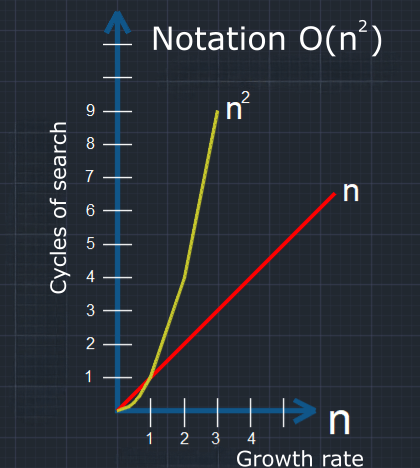
Big O notation is an indicator that provide us an idea of the algorithm performance and so, when someone mention an algorithm of type O(1) we can think of a good performance unlike the kind of algorithms O(n2) and higher which point to a not desirable performance.
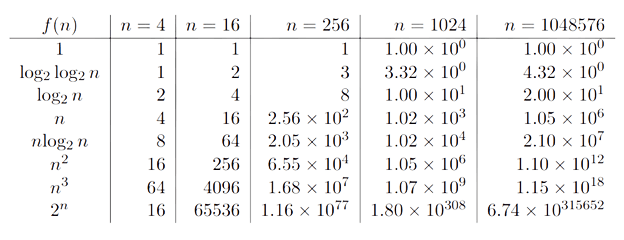
Java Class for Electors in the Algorithm Performance Analysis.
In order to keep going with the algorithm analysis above, it is necessary an object creation so that the electors id, name, last name could be set and why not his/her birth date, gender, voting status, voting date and time, the political party of which him/her support, and a field where an event name such as “Mega Elections 2021 Great Day” we can put in. All these data for each voter is going to be saved in a cluster (object), then after this operation will be collected one by one of the object in an array, ArrayList or LinkedList.
Big O notation is an indicator that provide us an idea of the algorithm performance and so, when someone mention an algorithm of type O(1) we can think of a good performance unlike the kind of algorithms O(n2) and higher which point to a not desirable performance.
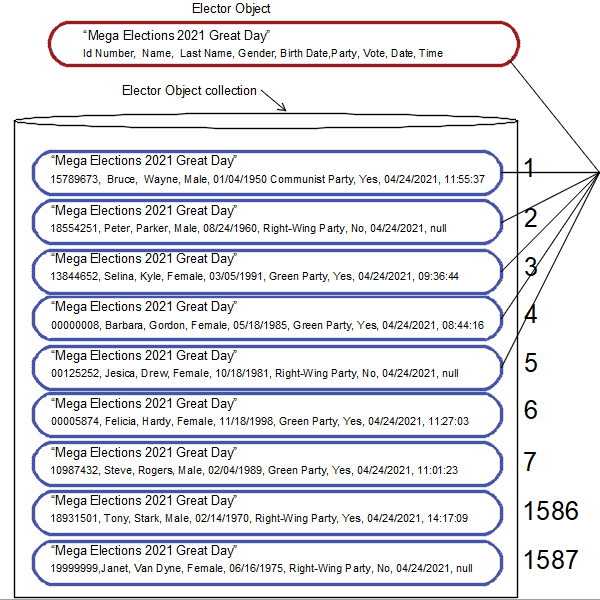
The first thing we need is get all the information of every voter from the source. Even though the following practice is far away of what it is, let’s say for the purpose of this post the whole data is inserted through the console and there are people adding it in the back. We need also write some code, but how could we start it? First, we need a class that allows us to collect all the information from the console, some kind of “GetFromConsole” Class by which the following code will be written:
Let’s construct the code above step by step naming our Java class “GetFromConsole” and so collect all data provided manually by the operator who is the alleged person in charge of insert it in the console giving at first the number of lines to be processed and then the lines that contain all the information of the voters.
Within the GetFromConsole class is required some method which allows read line by line, then word by word. For the first, exist in Java language a built-in class named BufferReader and inside this, a method called readLine(). So, checking the Java API for the class BufferReader we can see two constructors:
package societyAperson;import java.io.Console;import java.io.Reader;import java.io.BufferedReader;import java.util.StringTokenizer;import java.io.IOException;/*** The GetFromConsole is a class that works with Election2021 class* in an application that will be used to give examples of some data structures* and algorithms as well as talk about Java.** The current class takes the input data inserted by users in the console.* @author Hector Jose Vurchio Hurtado* @version 1.0* @since 2021-05-15*/class GetFromConsole{private Console console;private Reader reader;private BufferedReader br;int counter;/*** This method is used to get a StringTokenizer instance.* @exception IOException, required by br.readLine() method* @return a StringTokenizer instance.*/public StringTokenizer readForDim()throws IOException{console = System.console();reader = console.reader();br = new BufferedReader(reader);StringTokenizer tzer = new StringTokenizer(br.readLine());return tzer;}/*** This method is used to log an Elector class fields.* @exception IOException, required by readForDim() method* @returnan Elector instance.*/public Elector buffRead()throws IOException{int count = 0;StringTokenizer tzer = readForDim();BirthCertificate bicert = null;String placeOBirth = null;String birth = null;CitizenId citizenId = null;Elector elector = null;while (tzer.hasMoreTokens()) {switch(count){case 0:placeOBirth = tzer.nextToken();break;case 1:birth = tzer.nextToken();break;case 2:bicert = new BirthCertificate(placeOBirth,birth,tzer.nextToken().charAt(0));break;case 3:citizenId = new CitizenId(bicert,tzer.nextToken());break;case 4:citizenId.setName(tzer.nextToken());break;case 5:citizenId.setLastName(tzer.nextToken());elector = new Elector(citizenId);break;case 6:elector.setParty(tzer.nextToken());break;case 7:elector.setVoteStatus(tzer.nextToken().charAt(0));break;case 8:elector.setTime(tzer.nextToken());}count++;}return elector;}}
| 12 | |||||||
| 15789673 | Bruce | Wayne | m | 1950-01-04 | Comunist_Party | y | 11:55:37 |
| 18554251 | Peter | Parker | m | 1960-08-24 | Right_Wing_party | n | |
| 13844652 | Selina | Kyle | f | 1991-03-05 | Green_party | y | 15:53:17 |
| 00000008 | Barbara | Gordon | f | 1985-05-18 | Green_party | y | 08:44:16 |
| 00125252 | Jesica | Drew | f | 1981-10-18 | Right_Wing_party | n | |
| 00005874 | Felicia | Hardy | f | 1998-11-18 | Green_party | y | 11:27:03 |
| 10987432 | Steve | Rogers | m | 1989-02-04 | Green_party | y | 11:01:23 |
| 18931501 | Tony | Stark | m | 1970-02-14 | Right_Wing_party | y | 14:17:09 |
| 19999999 | Janet | VanDyne | f | 1975-06-16 | Right_Wing_party | n | |
| 00060552 | Bruce | Banner | m | 1983-05-19 | Comunist_Party | y | 13:44:28 |
| 00897456 | Carol | Danvers | f | 1990-04-19 | Right_Wing_party | n | |
| 00000465 | Clark | Kent | m | 1960-12-22 | Comunist_Party | y | 14:25:02 |

The first constructor uses a parameter in from Reader class, so, let’s check the Reader class in order to see how we could instantiate an object from such class:
This is an abstract class, that means it cannot be instantiated, so we have to take a look if within there is some Static Reader class method.
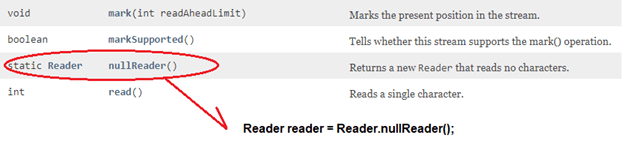
The reader object above is the only methods of a class Reader that is static and returns a Read class object but reads no characters. It doesn’t seem a good choice making us keep searching for another way to get an object of type Read since it could not be from this class.
The next class will be:
This is a Java built in class which is used to work with the console. A final class is the one that does not allow to be subclassed. From here on will not have more children classes. Let us examine if within this class there is a method such that we could achieve the Read object:
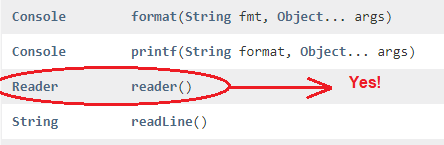
This method retrieves the unique Reader object associated with this console.
Ok, but we still need a Console object to instantiate the Read class. In the Java API for the Console class there is an explanation where is instantiated the Console object from a method in the System class.
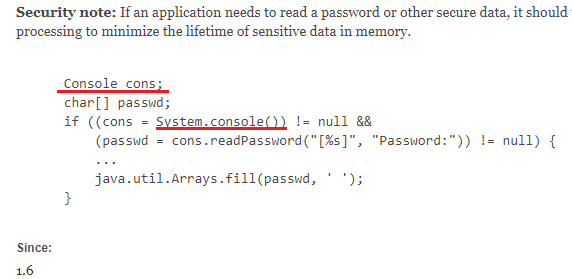
Looking at System class in the Java API:
static Console console() returns the unique console object associated with the current Java virtual machine, if any. With the last three object we already have, we proceed to build our code as follows:
Console console = System.console(); //our object Console
Reader reader = console.Reader();
BufferReader br = new BufferReader(reader); // at last our object BufferReader
From the BufferReader we get the readLine()methods that returns an String object.
Moreover, we need the line read word by word by which one suitable class would be StringTokenizer
class. The string tokenizer class allows an application to break a string into tokens.
Recapping the code we are constructing by wrapping the StringTokenizer object with the method from
BufferReader readLine() (returns an String):
Console console = System.console();Reader reader = console.Reader();BufferReader br = new BufferReader(reader);StringTokenizer tzer = new StringTokenizer(br.readLine()); // StringTokenizer already instantiated with the object name tzer.
With the code above, we continue by encapsulate it inside a method named readForDim() which
will returns an object of type StringTokenizer being at the same time located within the class GetFromConsole in the subsequent manner:
public StringTokenizer readForDim()throws IOException{console = System.console();reader = console.reader();br = new BufferedReader(reader);StringTokenizer tzer = new StringTokenizer(br.readLine());return tzer;}
The fields console, reader and br have been written as a global fields of GetFromConsole class.
class GetFromConsole{private Console console;private Reader reader;private BufferedReader br;int counter;public StringTokenizer readForDim()throws IOException{console = System.console();reader = console.reader();br = new BufferedReader(reader);StringTokenizer tzer = new StringTokenizer(br.readLine());return tzer;}
The method readForDim() must handle an IOException because is mandatory for the method stringLine() from the BufferReader class encapsulated inside as we can look over the Java API documentation at BufferReader class section:
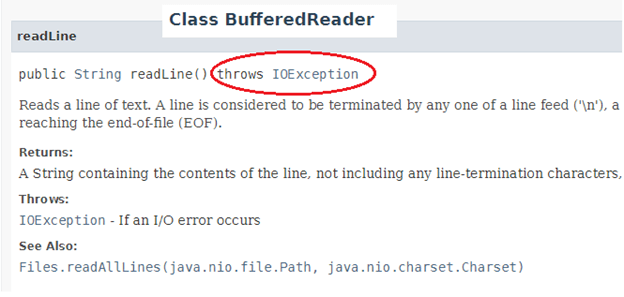
Failure to meet this requirement lead to have compile-time exception consequences.
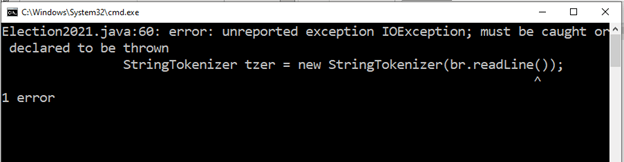
The method we already built is able to read a line inserted from the console and process it as an object StringTokenizer so that we can apply all the available methods and fields of this class, being nextToken() and hasMoreTokens() some of them. The next step is to create a method inside the getFromConsole class which returns from the second line on an object with all the information of every elector. This object belongs to the Elector class, class that we have still not mentioned but we must construct later to store the voter data. The code of elector will be shown now below but will be explained later on:
package societyAperson;import import java.time.LocalDate;import import java.time.LocalTime;/*** Elector is a class that works with Election2021 class* in an application that will be used to give examples of some data structures* and algorithms as well as talk about Java.** The current class is a sub class of Citizen having thought with it to be the last* subclass from Citizen. This encloses three new fields from its super class.* @author Hector Jose Vurchio Hurtado* @version 1.0* @since 2021-05-15*/final class Elector extends Citizen{static String eventOfDay="Mega Election 2021 Great Day";static LocalDate electDay=LocalDate.of(2021,4,24);private String party;private String voteStatus;private LocalTime time;/*** The constructor which start with CitizenId object.* @param citizenId, Object of type CitizenId.* @return Nothing.*/Elector(CitizenId citizenId){super( citizenId, "Country Of Freedom");}/*** a setter method to define the voter's party.* @param party, Object of type String with the name of* the elector's party.* @return Nothing.*/public void setParty(String party){this.party = party;}/*** a setter method to define the voter's status, that means* if he/she has or not exercise his/her vote. This method* populates the voteStatus field with yes or no.* @param s, using the letter y or n.* @return Nothing.*/public void setVoteStatus(char s){switch(s){case 'y':this.voteStatus = "Yes";break;case 'n':this.voteStatus = "No";break;}}* a setter method to define the voter's time at the moment* when he/she has exercised his/her vote.* @param time, with format hh:mm:ss.* @return Nothing.*/public void setTime(String time){String[] vt;if(time.contains(":")) {vt = time.split(":");}else{vt = new String[]{"0","0","0"};}this.time = LocalTime.of(Integer.parseInt(vt[0]),Integer.parseInt(vt[1]),Integer.parseInt(vt[2]));}public LocalTime getTime(){return this.time;}public String getVoteStatus(){return this.voteStatus;}public String getParty(){return this.party;}}
Every elector is a citizen from some country, state or city but not all citizens have the privilege of voting whether because is underage or convict or any other reason. That’s why Elector is a sub class of Citizen class which we have to build, also with the purpose of talk about the inheritance for the object-oriented programming.
package societyAperson;import import java.time.LocalDate;/*** Citizen is a class that works with Election2021 class* in an application that will be used to give examples of some data structures* and algorithms as well as talk about Java.** The current class enclose a field named citizenship and a CitizenId object.* @author Hector Jose Vurchio Hurtado* @version 1.0* @since 2021-05-15*/class Citizen{private CitizenId citizenId;private private String citizenship;/*** The constructor which populates the two private fields citizenship and citizenId.* @param citizenId, a CitizenId object.* @param citizenship, a String type object representing the citizenship.* @return Nothing.*/Citizen(CitizenId citizenId , String citizenship){this.citizenId = citizenId;this.citizenship = citizenship;}/*** public getters metods.*/public CitizenId getCitizenId(){return this.citizenId;}public String getCitizenship(){return this.citizenship;}/*** protected getters method written having in mind playing with the Java inheritance.* @return private fields from citizenId and birthCertificate class.*/protected String geId(){return this.citizenId.getId();}protected String getName(){return this.citizenId.getName();}protected String getLastName(){return this.citizenId.getLastName();}protected LocalDate getBirth(){return this.citizenId.citizenId.getBirthCertificate().getBirth();}protected LocalDate getBirth(){return this.citizenId.citizenId.getBirthCertificate().getGender();}protected LocalDate getBirth(){return this.citizenId.citizenId.getBirthCertificate().getPlaceOfBirth();}}
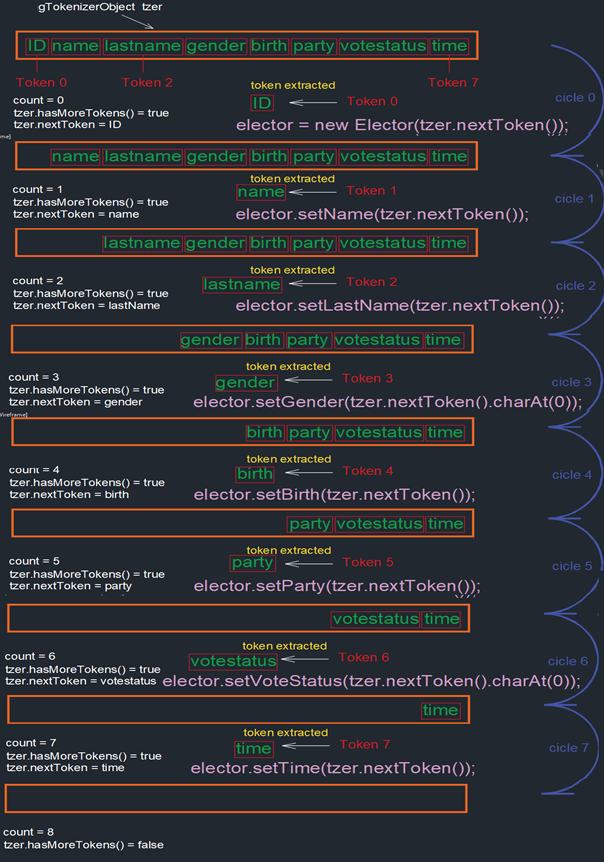
The first thing we can observe in GetFromConsole.java class is that we are using the
readForDim() method created before to get an StringTokenizer object named tzer with
which we will invoke the nextToken() method to get word by word of a line and
hasMoreTokens() method that reply us if there is another word in the text line. Each
word (token) must be inserted as appropriate inside the class Elector which in turn will be stored
in an object collection as an array or an array List.
So far, we have done the class that get the input data from the console and process it. Now the class that works as an engine to set in motion from the input to the object storage will be called Election2021. This class holds the Java main method, another method whose function get the amount of lines to be processed and of course get the lines of data.
package societyAperson;import java.util.StringTokenizer;import java.util.ArrayList;import java.io.IOException;import java.util.ListIterator;import java.util.Random;/*** The Election2021 runs an application that will be used to give examples* of some data structures and algorithms as well as talk about Java .** The current class takes the input data inserted by users in the console.* @author Hector Jose Vurchio Hurtado* @version 1.0* @since 2021-05-15*/public class Election2021{int n = 0;Elector elector;GetFromConsole gfc;StringTokenizer tzer;public ArrayList<Elector> elecList;/*** This method is used to get the arguments that users insert through console.* @exception IOException, required bytzer = gfc.readForDim()* and byelector = gfc.buffRead()to be thrown.* @see IOException.*/void getElectors() throws IOException{gfc = new GetFromConsole ();tzer = gfc.readForDim();n = Integer.parseInt(tzer.nextToken());elecList = new ArrayList<Elector>(n);for(int i = 0; i > n ; ++i){elector = gfc.buffRead();elecList.add( elector );}}/*** This method is used to print the arguments that users insert through console.*/private void printVoters() throws ClassNotFoundException,ClassNotFoundException,NoSuchFieldException,IllegalArgumentException,IllegalAccessException{Random random = new Rancom();int size = elecList.size();int index = random.nextInt(size-1);boolean empty = elecList.isEmpty();if(elecList.get(index).getClass().getName() == "societyAperson.Elector"){Elector elecObj = elecList.get(index);Elector2021Data electObjData = new Elector2021Data(elecObj);PrintResultsThree pr = new PrintResultsThree(electObjData);ListIterator iterator<Elector> iterator = elecList.listIterator();while(iterator.hasNext()){elecObj = iterator.next();electObjData = new Elector2021Data(elecObj);pr.printObject(electObjData);}} else {System.out.println("The Income object doesn't belong to societyAperson.Elector");}}/*** The main method that starts the program.* @param args, the command line arguments which not in use.* @exception IOException, required by elec2021.getElectors() and start() methods* to be thrown as well as InterruptedException, also required by waitFor() method to be thrown.* ClassNotFoundException is required by reflectionHeader method.* @see IOException,InterruptedException, NoSuchFieldException belonging to printVoters().*/public static void main(String[] args)throws IOException,InterruptedException,NoSuchFieldException,IllegalArgumentException,IllegalAccessException,ClassNotFoundException{Election2021 elec2021 = new Election2021();elec2021.getElectors();ProcessBuilder pb = new ProcessBuilder("cmd", "/c", "cls"); //clear screenpb.inheritIO().start().waitFor();elec2021.printVoters();}}
All those objects obtained by the input process are going to be stored in an rezsizable form of array such as Java ArrayList collection which will be named electList. This is how the ArrayList works:
Our E = Elector which is the object type that we are working with, so:
ArrayList<Elector> elecList = new ArrayList, where n is te first line of
input from console or the number of lines to be written. As we know the initial capacity, we will
construct then the ArrayList object taking into account this variable.
The Class and Object
Figure 26 shown below this small pagagraph gives us a brief overview of how an object looks like and what is not an object in java.
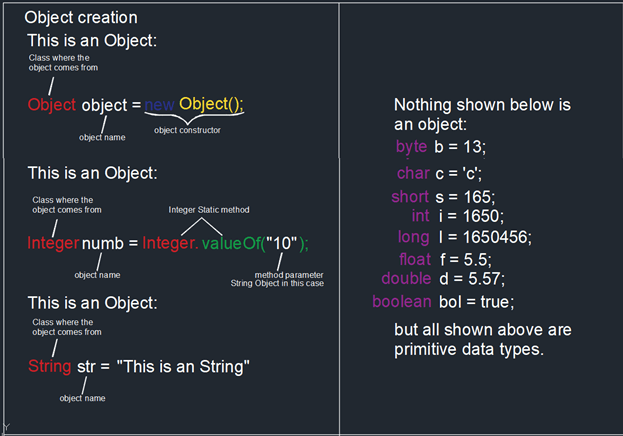
The set of things that compose an object and the actions it is capable of perform is given by the class in which such object comes from. This class is a composite of fields and methods of primitive types and objects as well. A class is predefined (library built-in) or is custom designed by a programmer. The fields are spaces where a primitive data type or an object from another class could be stored. The methods are spaces that generate a field through some process.
Inside a class, a field or method will be private, public or protected depending on the way this is accessible from other classes.
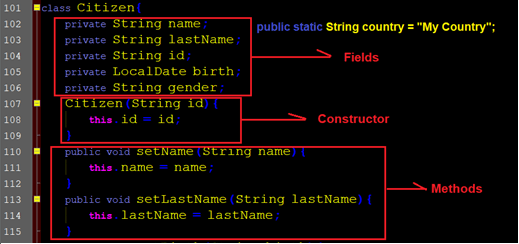
A field or a method is static if this belongs just to a class, not an object. For example
public static String country;
For each object that comes from Citizen class, it will be from the same country of citizenship therefore create an object of class Citizen is not needed to get the information about it. Country is a feature that is built-in. To access it one just need write. for example:
String country = Citizen.country;
if we want to protect the country fields against such act we must declare the country field as final, for example:
public static final String country = “My Country”;
We do not need invoking a constructor to find out what the country field contains but if we would like to know what is in the field name? We must create Citizen class object from another class:
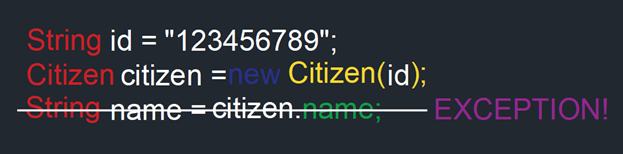
Name field is private, that means it is not accessible from outside the Citizen class, to achieve this the method must have a public accessor. Let’s see what about the getName() method which returns the name.
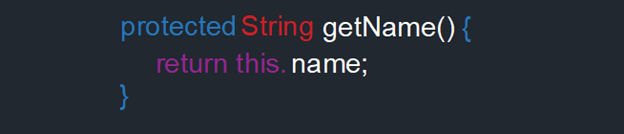
The accessor protected refers to a field or method that only can be accessed from outside the class if this is a subclass of Citizen class. As we can see in the interior of Citizen, it is designed just to set values through the setters methods since they are the only ones which have public access.
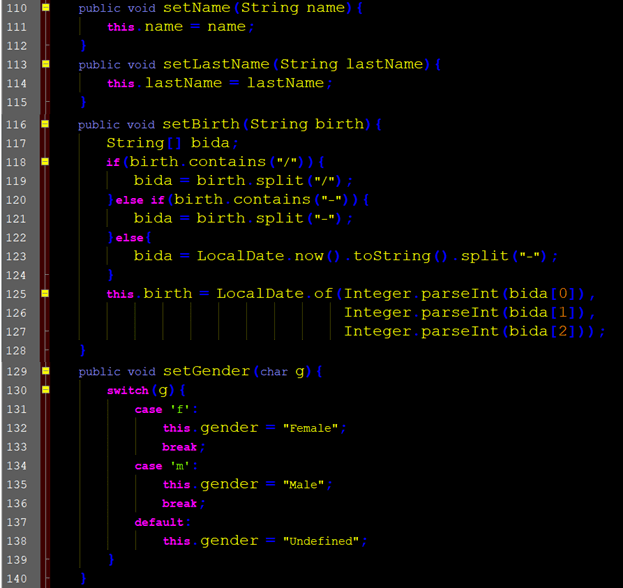
For this Citizen class we can say that if we want accessing to name, last name, gender and birth date fields we must build a subclass of this, it is designed to be inherited because has protected accessor although is a custom designed class.
Rebuilding the class and object.
Citizen is one of the classes previously written with the intention of explain the analysis performance of an algorithm, but this time we are going with the restructuration of the classes used.
The goal is having an object, in this case the Elector class that could be stored in a collection and perform all those operations which the data structure analysis contemplates. Building the Elector class implied writing many lines of code that at the end may entangle our lives if it is the case, we are meeting an error or want to change something. Counting on encapsulation and inheritance concept we could get this problem fixed.
To do this, we should enclose the appropriate code within a class and create a file for such class so that we can achieve a set of files, one for each class.
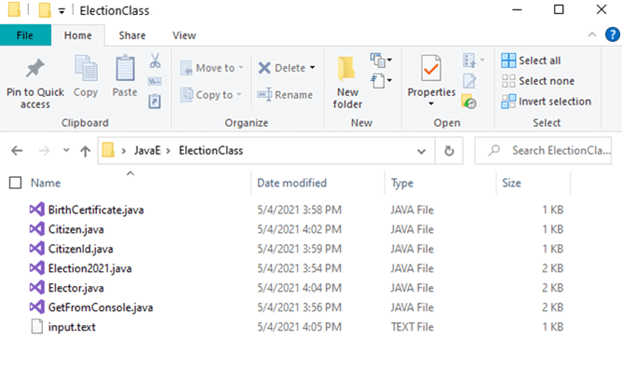
Since the main method is located in the class Election2021, this must be public and will be the class that will be called when compiling the code as follows:
javac Election2021.java
but how? In windows cmd as is this case:
C:\Users\MyPCname\ElectionClass> javac Election2021.java
The class getFromConsole is designed to process the input data whereas the class BirthCertificate has the purpose of built an object getting the date of birth, gender and place of birth so that it could be wrapped in the class CitizenID.
package societyAperson;/*** CitizenId is a class that works with Election2021 class* in an application that will be used to give examples of some data structures* and algorithms as well as talk about Java .** The current class enclose fields such as id number, name and last name* as well as an object of type BirthCertificate.* @author Hector Jose Vurchio Hurtado* @version 1.0* @since 2021-05-15*/class CitizenId{private BirthCertificate birthCert;private String id;private String name;private String lastName;/*** The constructor that populate the fields birthCert, id, name and lastName.* @param bc, a BirthCertificate object.* @param id, a String type object representing an id number.* @return Nothing.*/CitizenId(BirthCertificate bc,String id){this.birthCert = bc;this.id = id;this.name = "Undefined";this.lastName = "Undefined";}/*** Setter and getter methods.*/public void setName(String name){this.name = name;}public void setLastName(String lastName){this.lastName = lastName;}public BirthCertificate getBirthCertificate(){return this.birthCert;}public String getId(){return this.id;}public String getName(){return this.name;}public String getLastName(){return this.lastName;}}
package societyAperson;import java.time.LocalDate;/*** The BirthCertificate is a class that works with Election2021 class* in an application that will be used to give examples of some data structures* and algorithms as well as talk about Java .** The current class enclose parameters such as birth place, birth date an gender.* @author Hector Jose Vurchio Hurtado* @version 1.0* @since 2021-05-15*/class BirthCertificate{private LocalDate birth;private String gender;private String placeOfBirth;/*** The constructor that populate the fields birth, gender or placeOfBirth.* @param pob place of birth.* @param birth date of birth e.g. "2021-01-30" or "2021/01/30".* @param g e.g m or f.* @return Nothing*/public BirthCertificate(String pob, String birth, char g){this.placeOfBirth = pob;this.birth = setBirth(birth);this.gender = setGender(g);}private LocalDate setBirth(String birth){String[] bida;if(birth.contains("/")){bida = birth.split("/");}else if(birth.contains("-")){bida = birth.split("-");} else {bida = LocalDate.now().toString().split("-");}return LocalDate.of(Integer.parseInt(bida[0]),Integer.parseInt(bida[1]),Integer.parseInt(bida[2]));}private String setGender(char g({switch(g){case 'f':return "Female";case 'm':return "Male";default:return "Undefined";}}/*** getters methods to obtain the value of the private declared fields* of the current class.*/public String getGender(){return this.gender;}public LocalDate getBirth(){return this.birth;}public String getPlaceOfBirth(){return this.placeOfBirth;}}
The files Election2021.java, GetFromConsole.java, BirthCertificate.java, CitizenId.java, Citizen.java and Elector.java must be compiled applying the following procedure:
1. Writing in the Windows command line:
C:\Users\MyPCname\ElectionClass> javac Election2021.java

2. In the next line:
C:\Users\MyPCname\ElectionClass> java Election2021
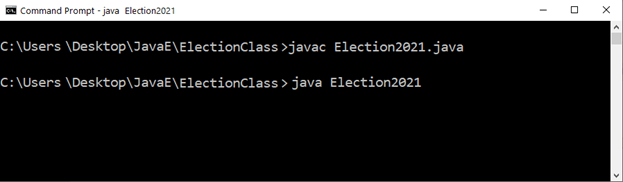
Above the Windows command line is requesting for the input and such input is:
| 12 | ||||||||
| Gotham_City | 1950-01-04 | m | 15789673 | Bruce | Wayne | Comunist_Party | y | 11:55:37 |
| Forest_hills | 1960-08-24 | m | 18554251 | Peter | Parker | Right_Wing_party | n | |
| Gotham_City | 1991-03-05 | f | 13844652 | Selina | Kyle | Green_party | y | 15:44:22 |
| Gotham_City | 1985-05-18 | f | 00000008 | Barbara | Gordon | Green_party | y | 08:44:16 |
| Mount_Wundagore | 1981-10-18 | f | 00125252 | Jesica | Drew | Right_Wing_party | n | |
| Queens | 1998-11-18 | f | 00005874 | Felicia | Hardy | Green_party | y | 11:27:03 |
| Brooklin | 1989-02-04 | m | 10987432 | Steve | Rogers | Green_party | y | 11:01:23 |
| Cambridge | 1970-02-14 | m | 18931501 | Tony | Stark | Right_Wing_party | y | 14:17:09 |
| Marvel | 1975-06-16 | f | 19999999 | Janet | VanDyne | Right_Wing_party | n | |
| Marvel | 1983-05-19 | m | 00060552 | Bruce | Banner | Comunist_Party | y | 13:44:28 |
| Comics | 1990-04-19 | f | 00897456 | Carol | Danvers | Right_Wing_party | n | |
| Smallville | 1960-12-22 | m | 00000465 | Clark | Kent | Comunist_Party | y | 14:25:02 |
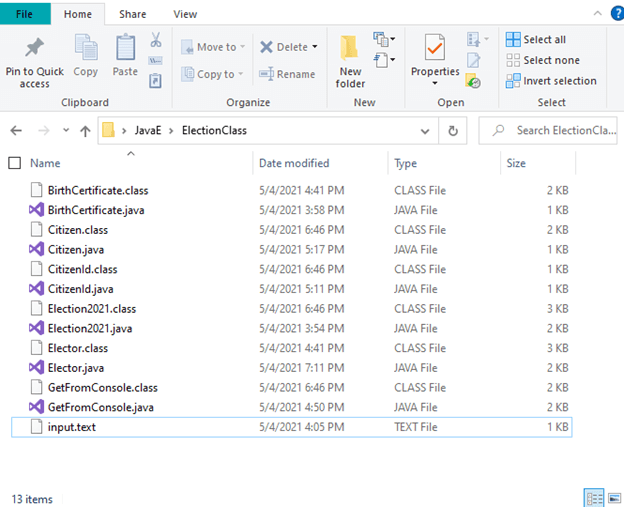
After compiling we can see the presence of .class extension in the folder where the .java files were located:
But this do not finish here, we should go far with the encapsulation and the next step would be the use of Java package. With package we put all the classes inside and fix the mess displayed above within the folder.
One illustration of such level of encapsulation is shown when importing a Java built-in class as for example:
import java.io.console;Java.io would be the installed package that contains the Console class.
The output for the data input above becomes as follows:
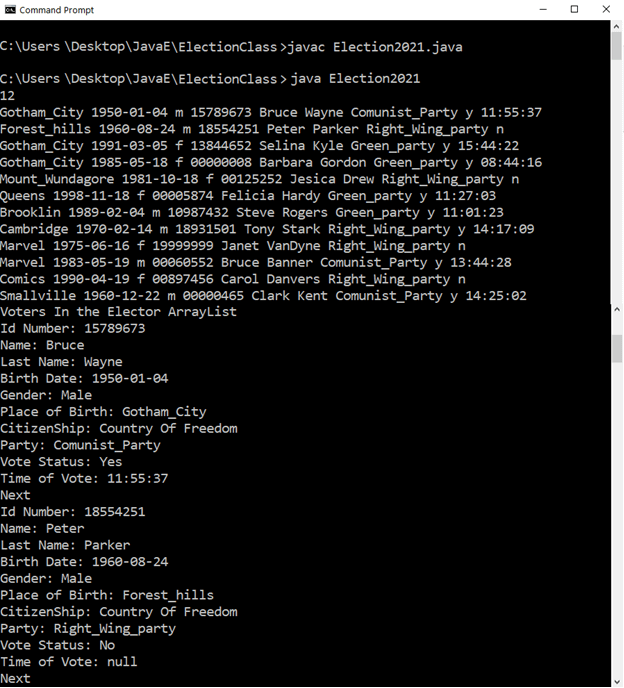
Setting the Date and Time
Until now, the output has been displayed messy and without a specific format, therefore designing a proper console output would be desirable to any user who wants to read the data yielded by the program.
As you can see, the Election2021 class is enclosed within a package named societyAperson, reason for which “>java societyAperson.Election2021” is written in the Windows prompt after compilation stage so that the application start running. Going down so many lines as much as 11 x number of persons in the list, can you figure out the kind of mess when searching between 20000000 of different data?
Give a format is important in this case specially with dates and time. Let us give first a date stamp at the time of printing the data output. The suitable packages and classes from the Java built-in library that this format would require to write the code will be the follows:
- java.time.ZoneId;
- java.time.ZonedDateTime;
- java.time.format.DateTimeFormatter;
- java.time.format.FormatStyle;
All four classes belong to java.time package and just in case if someone in another country wants the date and time in a local language can have it using the Locale class of java.util package.
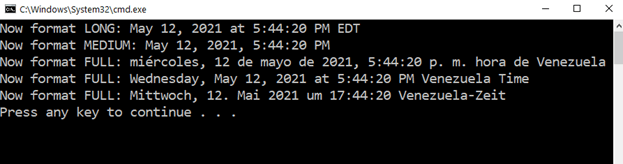
The image above shows five ways from the multiple ones to print the date and time chosen for the example that will be here indicated. The code that gave the results displayed is:
import java.time.ZoneId;import java.time.ZonedDateTime;import java.time.format.DateTimeFormatter;import java.time.format.FormatStyle;import java.util.locale;public class FormatForToday{private void today(){ZoneId zi = ZoneId.of("America/New_York");ZonedDateTime now = ZonedDateTime.now(zi);FormatStyle fs = FormatStyle.LONG;DateTimeFormatter formatter = DateTimeFormatter.ofLocalizedDateTime(fs);String formatted = formatter.format(now);System.out.println("Now format LONG: "+formatted);zi = ZoneId.of("America/Caracas");now = ZonedDateTime.now(zi);fs = FormatStyle.MEDIUM;formatter = DateTimeFormatter.ofLocalizedDateTime(fs);formatted = formatter.format(now);System.out.println("Now format MEDIUM: "+formatted);Locale lo = new Locale("es","VE");fs = FormatStyle.FULL;formatter = DateTimeFormatter.ofLocalizedDateTime(fs);formatted = formatter.withLocale(lo).format(now);System.out.println("Now format FULL: "+formatted);lo = new Locale("de","DE");fs = FormatStyle.FULL;formatter = DateTimeFormatter.ofLocalizedDateTime(fs);formatted = formatter.withLocale(lo).format(now);System.out.println("Now format FULL: "+formatted);}public static void main (String[] args){FormatForToday fft = new FormatForToday();fft.today();}}
The example treated with the code of the FormatForToday class is going to start printing the date and time when the data from Election2021.java is queried. But what is the building criteria for this code?
1. A ZoneId object: The available zoneIds can be consulted with the static method getAvailableZoneIds() from ZoneId class. Here “America/New_York” and “America/Caracas” are the zone ids used.
The available zoneIds can be consulted with the static method getAvailableZoneIds() from ZoneId class. Here “America/New_York” and “America/Caracas” are the zone ids used.
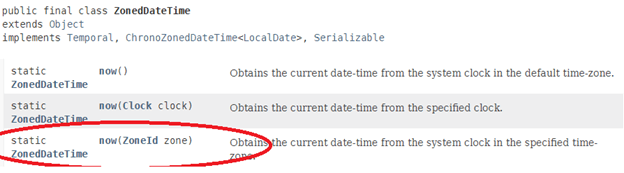
2. A ZonedDateTime object getting from one of its static factory methods now():
3. A FormatStyleObject:
4. Last but not least the DateTimeFormatter object:
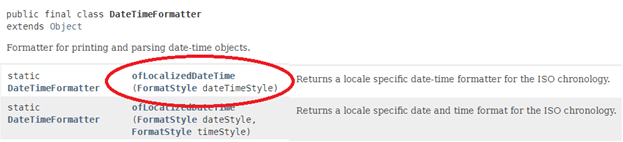
Once is achieved to build the last four object we finally could print:
ZoneId zi = ZoneId.of("America/New_York");ZonedDateTime now = ZonedDateTime.now(zi);FormatStyle fs = FormatStyle.LONG;DateTimeFormatter formatter = DateTimeFormatter.ofLocalizedDateTime(fs);String formatted = formatter.format(now);System.out.println("Now format LONG: "+formatted);
Yielding this code, a line in the windows prompt like this:
Now Format LONG: May 12, 2021 at 6:49:21 PM EDT
Formatting the Console Output
The image displayed below depicts a desire way in which the query result set will be displayed:
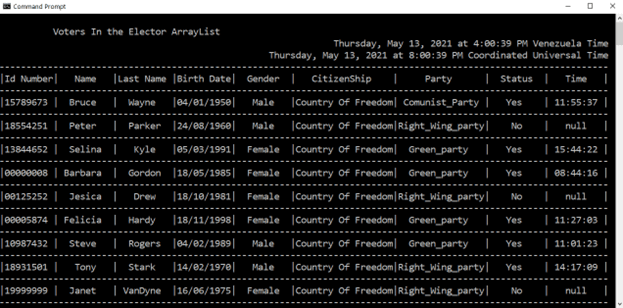
But how could this be achieved? Well, let us first start from the class that we have been previously working on, the Election2021 class. Checking “Setting the Date and Time” apart from observing the input format and the output yielded by the program that is something format less, we are also going to start from the date and time configuration of the previous part so that the query date and time will be stamped above the table.
To carry out this task, a new class within the package societyAperson will be inserted and this class includes the usage of the following objects:
- Locale
- ZoneId
- ZonedDateTime
- FormatStyle
- DateTimeFormatter
package societyAperson;
import java.time.LocalDate;
import java.time.LocalTime;
import java.time.ZoneId;
import java.time.ZonedDateTime;
import java.time.format.DateTimeFormatter;
import java.time.format.FormatStyle;
import java.util.Locale;
import java.io.IOException;
/**
* PrintResult is a class that works with Election2021 class
* in an application that will be used to give examples of some data structures
* and algorithms as well as talk about Java .
*
* The current class is used to print in the system console the input data
* after processing with a given format.
* @author  Hector Jose Vurchio Hurtado
* @version 1.0
* @since   2021-05-15
*/

public class PrintResults{
	private ZoneId zi;
	private ZonedDateTime now;
	private FormatStyle fs;
	private DateTimeFormatter formatter;
	private String sline;
	private String format;
	/**
	* The constructor which stamps the local and global date and time
	* giving at the same time an initial format.
	*/
	PrintResults(){
		System.out.println("");
		System.out.println("          Voters In the Elector ArrayList");
		System.out.printf("%1$113s%n",todayDate("America/Caracas"));
		System.out.printf("%1$113s%n",todayDate("UTC"));
		headFormat();
	}
	/**
	* This method is used to get the current date and time.
	* @param zone, representing the zone id.
	* @return the formatted current date and time as an String Object.
	*/
	private String todayDate(String zone){
		Locale lo = new Locale("en","VE");
		zi = ZoneId.of(zone);
		now = ZonedDateTime.now(zi);
		fs = FormatStyle.FULL;
		formatter = DateTimeFormatter.ofLocalizedDateTime(fs);
		return formatter.withLocale(lo).format(now);
	}
	/**
	* This method gives the the table head format.
	*/
	private void headFormat(){
		sline = new String(new char[113]).replace('\0', '-');
		System.out.println(sline);
		format = "|%1$-9s|%2$-10s|%3$-10s|%4$-10s|%5$-10s|%6$-18s|%7$-16s|%8$-10s|%9$-10s|%n";
		System.out.printf(format,
								center("Id Number",9),
								center("Name",10),
								center("Last Name",10),
								center("Birth Date",10),
								center("Gender",10),
								center("CitizenShip",18),
								center("Party",16),
								center("Status",10),
								center("Time",10));
		System.out.println(sline);
	}
	/**
	* This method gives the format of a given date.
	* @param date, the given date as an istance of LocalDate.
	* @return the formatted date as an String Object.
	*/
	private String dateFormat(LocalDate date){
		String datePattern = "dd/MM/yyyy";
		DateTimeFormatter dateFormatter = DateTimeFormatter.ofPattern(datePattern);
		return date.format(dateFormatter);
	}
	/**
	* This method gives the format of a given time.
	* @param time, the given time as an istance of LocalTime.
	* @return the formatted time as an String Object.
	*/
	private String timeFormat(LocalTime time){
		if(time == null){ //if -> avoiding null pointer exception
			return "null";
		}else{
			String timePattern = "HH:mm:ss";
			DateTimeFormatter timeFormatter = DateTimeFormatter.ofPattern(timePattern);
			return time.format(timeFormatter);
		}
	}
	/**
	* This method justify the text aligning at the center.
	* @param str, the given String text to be aligned.
	* @param availSp, number of characters available for the cell.
	* @return the center aligned String Object.
	*/
	private String center(String str,int availSp){
		int strLen = str.length();
		int pad = (availSp - strLen)/2;
		String centered = "";
		for(int i = 0;i
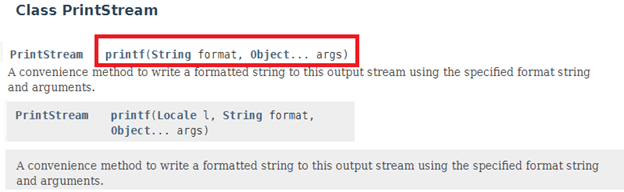
Once instantiated PrintResult class, its constructor calls println() and printf() methods from PrintStream of the java built-in class along with todayDate() method written to get the date and time with a given format. The printf() static method from PrintStream class is used to provide such format:
 -->
-->
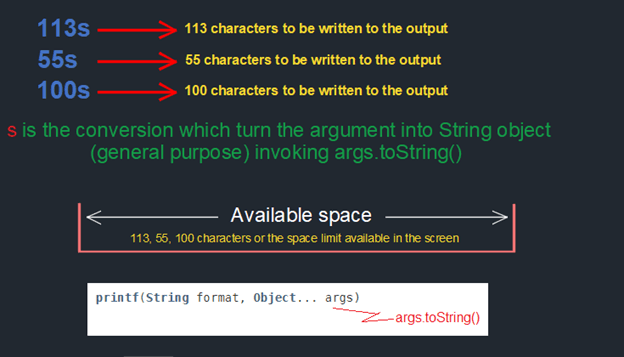
From the Printstream java class documentation we can take a description of printf() method and check the Format String Syntax link provided which will lead us to Formatter class. The format specifier gives us pattern from which the desired format could be constructed. The Formatter class provide all the available information to fill out such pattern. In the PrintResult class constructor has been used a pattern "%1$113s%n" that means:
%[argument_index$]
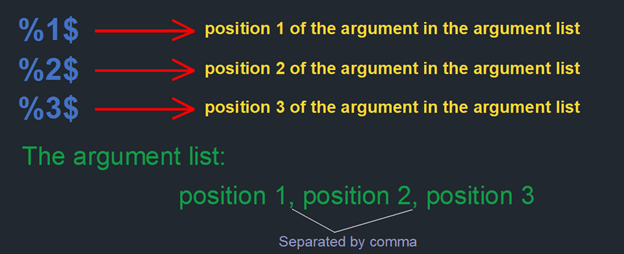
A flag is not used here (is optional) and the [width] and conversion selected is 113s which is explained graphically below how it works:
 -->
-->
todayDate(String zone) is a method that returns a String object of the today date and time in its respective time zone and in a given format (See the post Setting the Date And Time). Subsequently the steps to develop the output format:
		System.out.println("");
		System.out.println("          Voters In the Elector ArrayList");
		System.out.printf("%1$113s%n",todayDate("America/Caracas"));
		System.out.printf("%1$113s%n",todayDate("UTC"));
This yields the next result in the Windows prompt:

Within the constructor is activated also a headFormat() method that give us the table header, its result is:

The object of the class PrintResult have a declared method printObject whose parameter is of type Elector extracting from it all its declared getter methods to get the desired formatted information. There is a more elegant way to print the results by doing reflection of the Elector object, but some information fields come from its super classes, resulting in writing as much code as here written. It would be better writing a class relying on the use of reflection turning the code more reusable.